09. Perform Tab

Synchron Player 전체 연주 방식과 사용성을 바꾸는 실시간 글로벌 컨트롤러를 지정함.
Destination은 다음 옵션에서 고르면 됨.
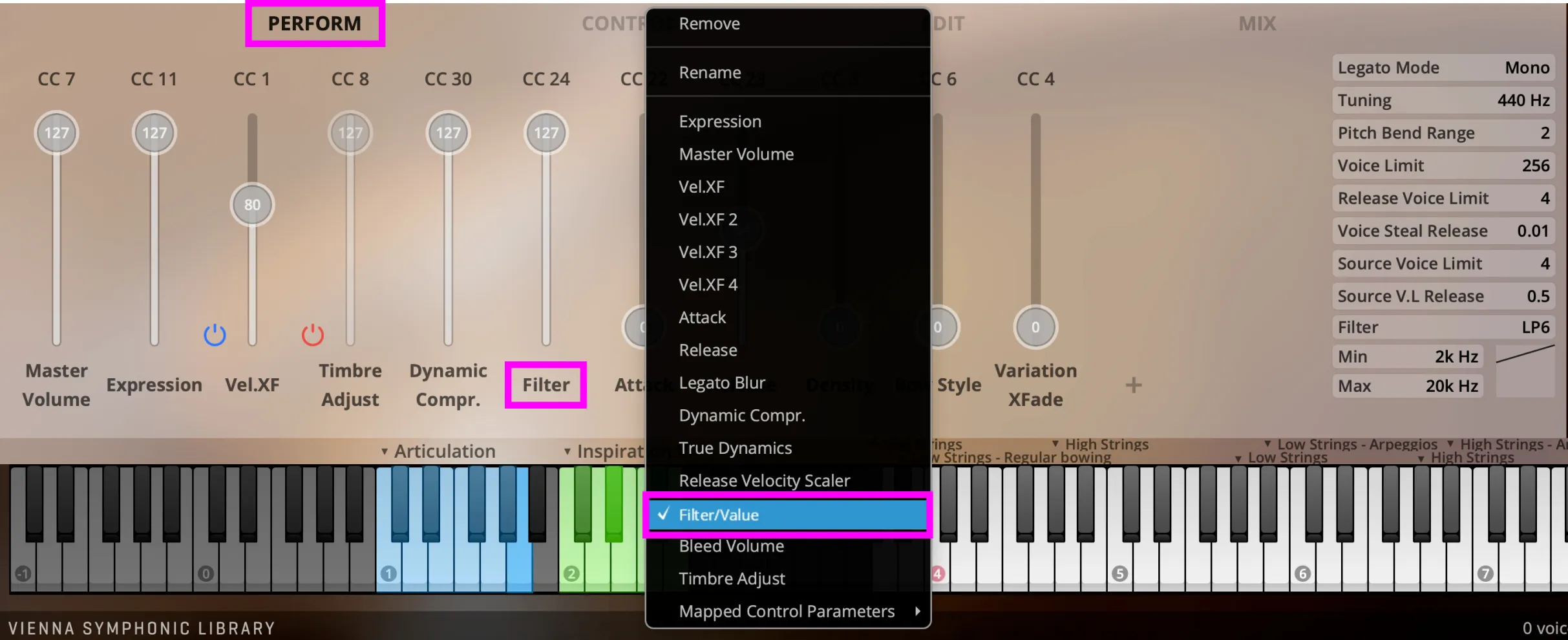
위 상태창은 Vienna Symphonic Library Synchron Player의 Perform 탭 인터페이스. Master Volume, Expression, Vel.XF, Filter 같은 컨트롤러 할당 항목이 보이며, 드롭다운 메뉴에서 Filter/Value를 선택한 상태임.
Source는 목록 안에서 자유롭게 지정하면 됨. Dimension Controller도 여기에서 선택할 수 있음.
-
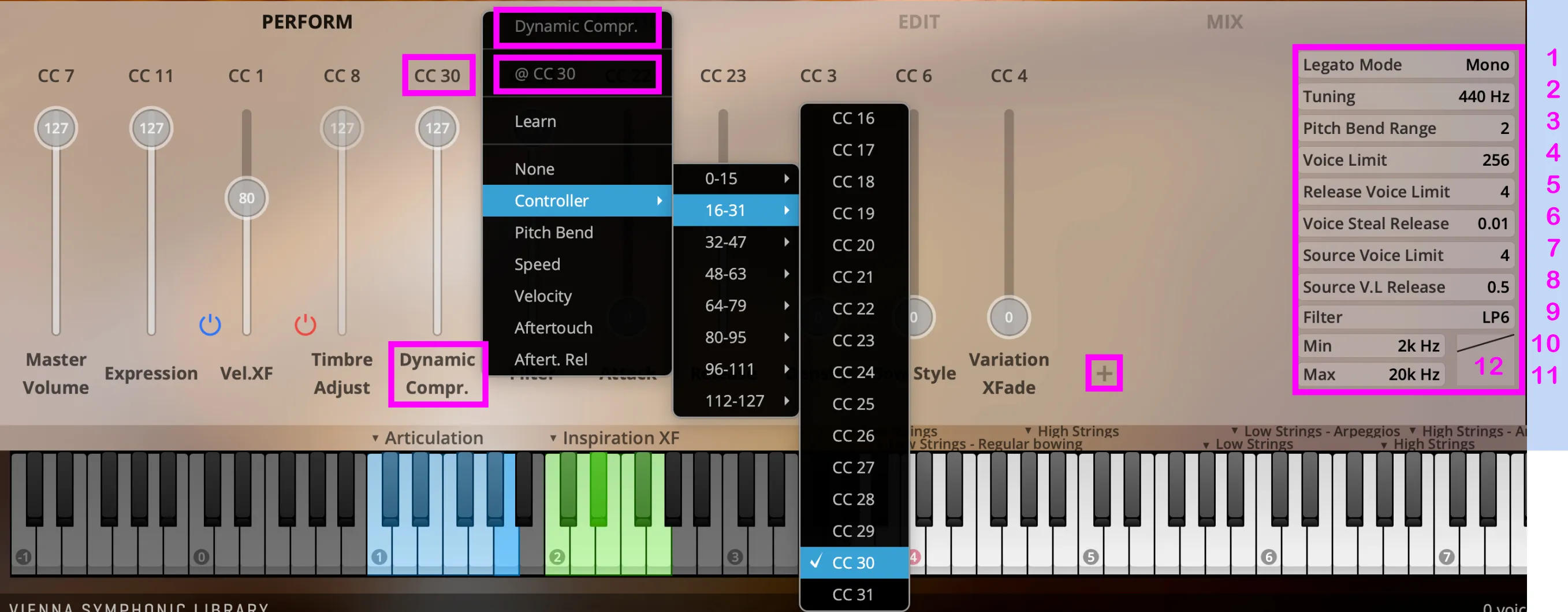
Legato Mode: 레가토 아티큘레이션에 적용할 전체 인터벌 모드를 정함. Monophonic / Polyphonic.
-
Tuning: 기준음 A4의 마스터 튜닝 주파수를 정함. 기본값: 440 Hz. 범위: 420–460 Hz.
-
Pitch Bend Range: 마스터 피치 벤드 범위를 반음 단위로 정함.
-
Voice Limit: Player 인스턴스 하나에서 동시에 재생할 보이스 수의 소프트 리밋을 정함. 이 한도를 넘으면 Synchron Player가 보이스를 스틸링함.
-
Release Voice Limit: 키 하나에서 트리거할 Release Sample의 최대 개수를 정함. 재생 보이스가 많아지면 스트리밍 리소스도 더 많이 씀.
-
Voice Steal Release: 스틸링한 보이스를 얼마나 빠르게 페이드아웃할지 정함.
-
Source Voice Limit: 소스 하나에서 동시에 재생할 보이스 수의 소프트 리밋을 정함. 이 한도를 넘으면 Synchron Player가 보이스를 스틸링함. 드럼 같은 일부 악기에서만 소스를 나눔. 드럼에서는 베이스 드럼을 한 소스, 스네어 드럼을 다른 소스로 보는 식임.
-
Source V.L. Release: 소스별로 스틸링한 보이스를 얼마나 빠르게 페이드아웃할지 정함.
-
Filter: 여러 필터 유형 중 하나를 고름. Low Pass 6/12, High Pass 6/12.
-
Min: 필터의 최소 주파수. 드래그하면 값이 바뀜. Shift+드래그로 미세 조정, Ctrl/Command+클릭으로 초기화, 더블 클릭으로 직접 입력, 우클릭으로 컨트롤러 지정.
-
Max: 필터의 최대 주파수. 드래그하면 값이 바뀜. Shift+드래그로 미세 조정, Ctrl/Command+클릭으로 초기화, 더블 클릭으로 직접 입력, 우클릭으로 컨트롤러 지정.
-
Filter curve display: 추가 커스터마이징 옵션을 고름. 커브를 잡아 움직이면 직접 조정됨.
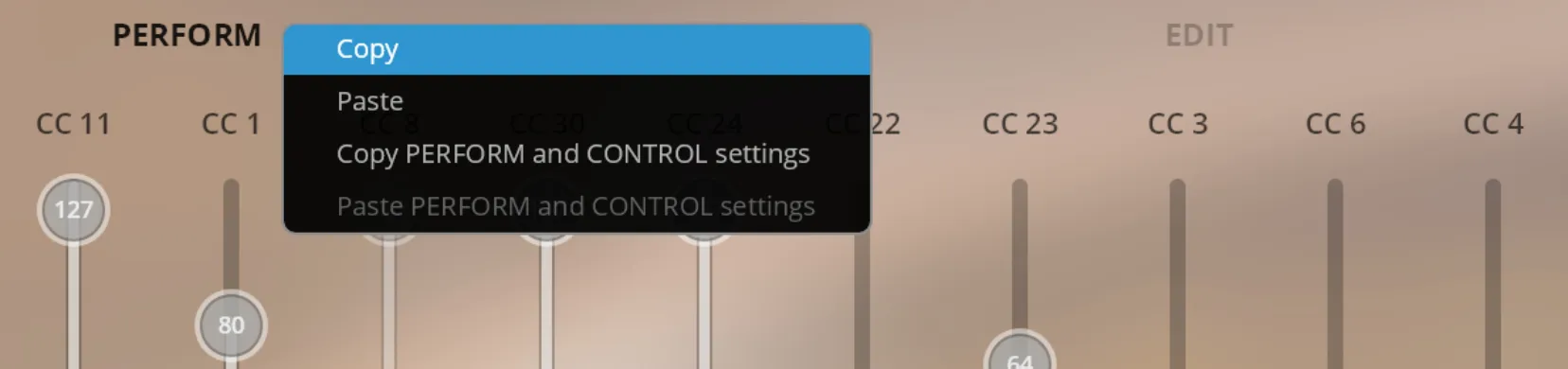
Perform 설정을 복사해 다른 Synchron Player 인스턴스에 붙여넣을 수 있음. Perform 설정과 Control 설정도 한 번에 복사해 붙여넣을 수 있음. Control 탭에서도 같은 방식으로 복사하고 붙여넣으면 됨.
Controllers Overview
Section titled “Controllers Overview”| MIDI CC | Controller name | Description | Default value |
|---|---|---|---|
| 1 | Vel.XF | 롱 아티큘레이션에서 다이내믹 레이어를 서로 자연스럽게 넘겨 줌 | 80 |
| 7 | Master Volume | 악기 입력 볼륨을 정함 | * |
| 8 | Timbre Adjust | 악기 음색을 더 부드럽게 만듦 | 127 |
| 11 | Expression | 볼륨을 자동 제어해 다이내믹을 더 섬세하게 조절함 | 127 |
| 22 | Attack | 각 아티큘레이션을 연주할 때 어택 사운드를 바꿈 | 0 |
| 23 | Release | 각 아티큘레이션을 연주할 때 릴리즈 사운드를 바꿈 | 64 |
| 24 | Filter | 값을 낮추면 로우패스 필터를 걸어 줌 | 127 |
| 25 | Humanize Delay Scale | 타이밍에 불규칙성을 더함 | * |
| 26 | Humanize Tuning | 음정에 불규칙성을 더함 | * |
| 27 | Humanize Amount | 튜닝과 딜레이에 불규칙성을 더해 사람 연주처럼 만듦. 위 Tuning과 Delay 항목 참고 | 127 |
| 30 | Dynamic Compr. | 악기의 다이내믹 레인지를 압축함 | 127 |
| 31 | Dynamic Range | 악기의 다이내믹 레인지를 압축하거나 확장함 | 64 |
| 33 | Legato Blur | 음이 겹칠 때 레가토 전환을 흐릿하게 만듦 | * |
| 34 | Stretch Factor | 타임 스트레칭을 켜면 스트레칭 양을 자동 제어함 | 64 |
- 악기마다 다름